Diamond Hearts Procreate Brush: Sparkle with Style
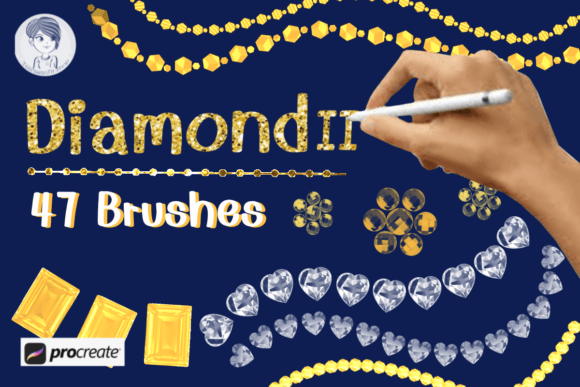
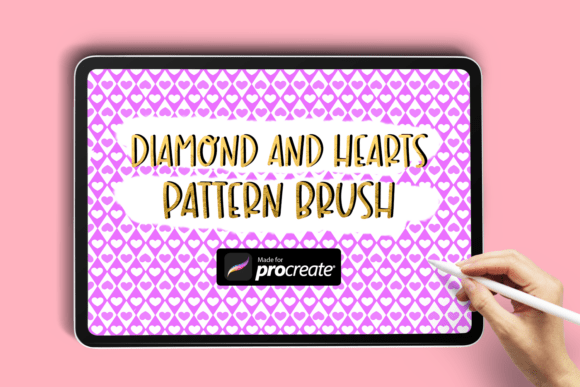
Adding a touch of elegance and charm to digital artwork has never been easier with the Diamond Hearts Procreate Brush. This specialized brush seamlessly blends sparkling diamonds with delicate hearts, creating a decorative line perfect for borders, accents, or intricate design elements. Whether you're crafting a romantic illustration or designing a feminine layout, this brush brings a refined sparkle that enhances your creative vision.
What Makes the Diamond Hearts Brush Unique
Unlike standard brushes, the Diamond and Hearts Procreate Brush combines two beloved symbols—diamonds and hearts—into a continuous, flowing line. The brush is designed to maintain consistency in spacing and scale, ensuring that your digital embellishments look polished and intentional. It’s especially effective for illustrators and designers who want to add a romantic or whimsical touch without spending hours drawing by hand.
Because it's a line brush, you can create flowing borders, frame elements within your composition, or add subtle background textures. The brush works seamlessly within Procreate, allowing you to adjust pressure, size, and opacity to suit your artistic needs.
Creative Applications for Different Styles and Projects
The versatility of the Diamond and Hearts Brush makes it ideal for a wide range of artistic styles and design applications. Here are a few ways to incorporate it into your work:
- Valentine’s Day Illustrations: Use the brush to outline love notes, frame portraits, or add sparkle to greeting cards. Its romantic motif pairs beautifully with soft color palettes and cursive typography.
- Coquette Aesthetic Designs: This brush complements the coquette style perfectly, adding dainty embellishments to fashion illustrations, planner layouts, or social media templates.
- Elegant Branding Elements: Designers can use it to add decorative dividers in digital portfolios, wedding stationery, or boutique packaging concepts.
- Personal Journals and Planners: Enhance your digital bullet journals with heart-diamond borders around weekly spreads or special event pages.
How to Use the Diamond Hearts Brush Effectively
While the brush is easy to use, getting the most out of it requires a bit of planning and intention. Here are some tips to help you make the most of this creative tool:
- Layer Thoughtfully: Apply the brush on a separate layer so you can edit or adjust it independently. This also allows you to add shadows or glow effects for extra dimension.
- Experiment with Colors: Although the brush is white by default, you can recolor it using blending modes or layer styles to match your palette.
- Combine with Other Brushes: Pair it with minimalist line art or textured brushes to balance sparkle with simplicity.
- Adjust Brush Settings: Play with spacing, grain, and opacity settings to create variations in density and texture.
Who Can Benefit from the Diamond Hearts Brush
This brush is particularly useful for artists and creators who work in romantic, feminine, or elegant styles. Here’s how different users can apply it:
- Illustrators: Add soft decorative lines around character illustrations or scene compositions.
- Graphic Designers: Use it in branding mockups, social media templates, or editorial layouts that require a touch of elegance.
- Content Creators: Enhance digital stickers, Canva templates, or Instagram stories with a romantic sparkle.
- Bloggers and Entrepreneurs: Create visually appealing digital products, such as printable planners or themed guides.
How to Download and Install the Brush
Getting started with the Diamond and Hearts Procreate Brush is simple:
- Download the ZIP folder to your iPad.
- Extract the .brush file.
- Open the “Files” app and locate the extracted brush.
- Tap the file and choose “Open in Procreate” to import it directly into your brush library.
Once imported, you’ll find it under your “My Brushes” section. From there, you can begin incorporating it into your artwork instantly.
Maintaining Clarity and Consistency in Your Artwork
While the Diamond and Hearts Brush adds a lovely decorative touch, it’s important to use it intentionally to avoid clutter. Here are some best practices:
- Use Sparingly: Too many sparkles can distract from your main subject. Reserve the brush for key areas that benefit from added visual interest.
- Align with Your Theme: Make sure the brush complements your overall design style rather than competing with it.
- Test in Different Sizes: Try using the brush at various scales to see how it looks in both small and large compositions.
Final Thoughts on Creative Sparkle
The Diamond Hearts Procreate Brush is more than just a decorative tool—it’s a way to infuse personality and elegance into your digital art. Whether you're designing for a client, creating personal artwork, or crafting digital content, this brush offers a refined way to express creativity with a romantic flair. By understanding how to use it effectively and integrating it into your workflow, you can elevate your designs with minimal effort and maximum impact.