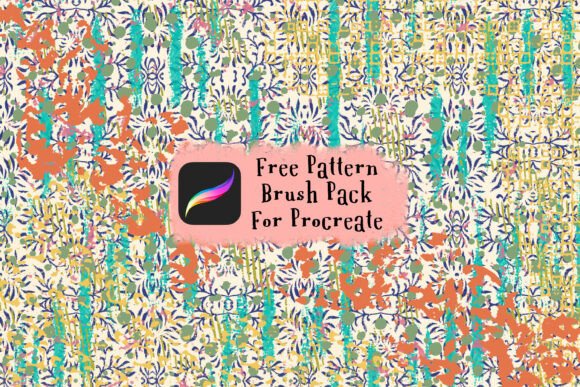
Free Procreate Pattern Brush Pack: Elevate Your Digital Art Workflow
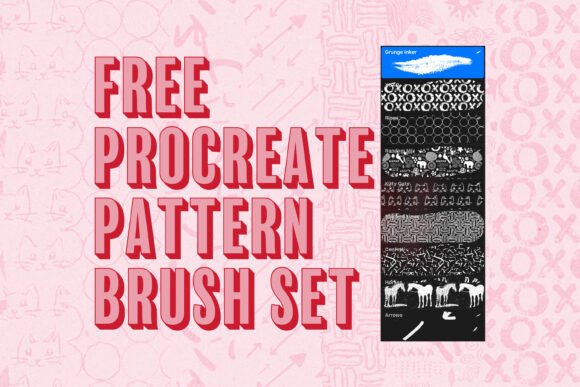
For digital artists and creators working on the iPad, having the right tools can make a significant difference in both output quality and creative efficiency. The Free Procreate Pattern Brush Pack offers a set of 11 distinct, seamless tiling brushes designed specifically for use within the Procreate app. These brushes are not just a convenience—they’re a practical enhancement to any creative process that involves pattern design, texture work, or repeated visual motifs.
What Is the Free Procreate Pattern Brush Pack?
The Free Procreate Pattern Brush Pack is a downloadable set of brushes that allows artists to create continuous, tileable patterns without manual repetition or complex layering. Each brush is pre-configured to tile seamlessly, meaning that as you paint, the design repeats in a way that looks natural and cohesive. This eliminates the need for manual alignment or post-processing adjustments that often slow down the creative workflow.
These brushes are ideal for illustrators, surface designers, graphic artists, and even educators who incorporate digital art into their curriculum. Since the brushes are built for Procreate—a leading digital art application on the iPad—they integrate directly into an existing ecosystem that many creators already use daily.
How It Fits Into a Creative Workflow
Whether you're working on a personal project or a client deliverable, the Free Procreate Pattern Brush Pack can be introduced at various stages of your process. Here's how it aligns with different creative phases:
- Pre-Production: Use the brushes to quickly sketch out pattern ideas before committing to final artwork. This helps in visualizing how motifs will repeat and interact within a layout.
- Production: During the main design phase, these brushes can be used to fill backgrounds, add textures, or build intricate repeating elements without disrupting your flow.
- Post-Production: If you're revising or repurposing artwork, the seamless nature of the brushes makes it easier to adjust patterns without visible seams or inconsistencies.
Integration with Other Tools and Platforms
Procreate itself is part of a broader creative toolkit for many digital artists. The Free Procreate Pattern Brush Pack works alongside other tools such as Adobe Photoshop, Illustrator, and Affinity Designer—especially when exporting artwork for further refinement or print. Because the brushes generate clean, repeatable patterns, they can be exported as pattern swatches or image files that are ready for use in other software environments.
Additionally, if you're collaborating with other designers or sharing assets for a larger project (such as a branding package or product design), the consistency of these patterns ensures that your work integrates smoothly with others' contributions.
Practical Implementation Tips
Here are some practical ways to incorporate the Free Procreate Pattern Brush Pack into your creative routine:
- Start with a Grid: Before applying any pattern brush, set up a grid or guide layer to align your design elements. This ensures that your tiling remains consistent across the canvas.
- Layer Strategically: Use separate layers for different pattern elements. This gives you more control over opacity, blending modes, and editing without affecting the rest of your artwork.
- Test at Scale: Zoom in and out frequently to check how the pattern appears at different sizes. This is especially important for designs that will be printed or used on various surfaces.
- Customize Brushes: While the brushes are pre-configured, you can tweak settings like spacing, scattering, and grain to create variations that suit your specific project.
Preparing for Use: Compatibility and Setup
Before diving into your project, ensure that your iPad and Procreate app are updated to the latest versions to maintain compatibility. The Free Procreate Pattern Brush Pack is designed to work with Procreate’s brush engine, so importing and using them should be a straightforward process.
Once downloaded, simply import the brush files into Procreate via the brush library. From there, you can organize them into custom brush sets or keep them in a dedicated folder for quick access. Proper organization will help maintain efficiency, especially when switching between different types of brushes during a session.
Quality Control and Consistency
One of the biggest challenges in pattern design is maintaining visual consistency across repeated elements. With the Free Procreate Pattern Brush Pack, each brush is tested for seamless tiling, ensuring that edges align perfectly without visible breaks or distortions.
Still, it’s a good practice to do a test render on a new canvas before applying the pattern to your main artwork. This allows you to spot any irregularities early and adjust accordingly. If you’re designing for commercial use—such as fabric printing or product packaging—this level of precision is crucial for maintaining professional quality.
Long-Term Use and Scalability
The Free Procreate Pattern Brush Pack isn’t just a one-time-use tool. As you build your digital art library, these brushes can become a foundational part of your creative toolkit. Whether you're designing greeting cards, website backgrounds, or social media templates, the ability to quickly generate seamless patterns can save hours of manual work.
Moreover, as your skills grow, you may find opportunities to combine these brushes with other custom brushes or textures to create unique hybrid effects. This adaptability makes the pack a valuable asset not just for current projects, but for future creative endeavors as well.
Use Cases Across Industries and Hobbies
The versatility of the Free Procreate Pattern Brush Pack makes it suitable for a wide range of applications:
- Freelance Illustrators: Speed up background creation for editorial or commercial illustrations.
- Surface Designers: Quickly prototype fabric, wallpaper, or gift wrap patterns for client presentations.
- Educators: Introduce students to digital pattern design without the complexity of manual tiling techniques.
- Content Creators: Design eye-catching templates for YouTube thumbnails, Instagram stories, or blog headers.
- Hobbyists: Explore new creative avenues with minimal learning curve and maximum visual impact.
Final Thoughts on Integration and Execution
Integrating the Free Procreate Pattern Brush Pack into your creative process doesn’t require a complete workflow overhaul. Instead, it enhances what you’re already doing by reducing repetitive tasks and offering more flexibility in how you approach pattern design. By understanding how and when to use these brushes, you can streamline your creative execution and focus more on artistic expression.
As with any digital tool, the key is consistent use and thoughtful application. Over time, the brushes will become a natural extension of your creative toolkit—helping you bring ideas to life with greater ease and efficiency.